

Excel – Conditional Formatting Example I have been asked by a former student for some help with Excel’s Conditional Formatting. My student needed help setting up a column of data […]
You are browsing archives for
Category: Microsoft Office
Excel vLookup Example

Excel vLookup Example While teaching Excel classes over the past few semesters I get many questions on how to perform certain fuctions in Excel. Below is another request for and […]
Office 365: One License, Five Devices

#Office365: One License, Five Devices View: Office 365: One License, Five Devices Also visit our Amazon Local Associates Page
Three Ways the New Office 365 Takes the Work out of Working...

Excel Date Calculations

How to use simple Excel Date Calculations Several students have asked about Excel Date Calculations. Here is a good quick example to calculate the difference between todays date ( “today()”) and […]
Free Online Excel Training

For my students in the Excel classes, here is some Free Online Excel Training. These training videos are from Microsoft and LinkedIn and walk you through many features of Microsoft […]
winmail.dat Attachments

Users receiving Winmail.dat instead of real attachments It seems that some non – Exchange or Office 365 users are getting winmail.dat attachments in emails rather than the actual attachments. I […]
Microsoft PowerPoint Shortcut Keys

For my students in the PowerPoint 2016 classes, below is a reference card with Microsoft PowerPoint Shortcut Keys. To download click the link below. For Microsoft Excel Shortcuts Keys For Microsoft […]
Where to get Office 365 for Personal Use

This post is primarily for my students who have subscribed but it also good for anyone that needs Office 365 Personal. I have posted below two options for buying Office […]
How to add increment time by minutes in Excel
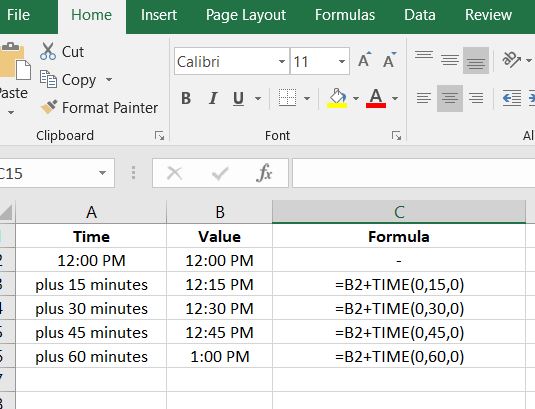


Adding Time Increments in Excel I have been teaching Excel classes for many years and this is the first time I have had a student ask me this question. “How […]