
Lots of new classes coming up in the Fall of 2023. If you are interested in advancing your Excel, Word or WordPress skills, there is still time to sign up […]
You are browsing archives for
Category: Office 365
How to Strikethrough Text in Microsoft Excel

Microsoft Excel is a powerful spreadsheet application that is widely used for data analysis, calculations, and organizing information. While it is primarily known for its number-crunching capabilities, Excel also offers […]
How to get Word Count in Microsoft Word

Word Count in Microsoft Word Have you ever needed to get the word, page, paragraph or line count in an MS Word Document? Below are some examples of how to […]
Excel Reconciliation and Decimal Precision

How to reconcile Excel with a payroll system? I had a past student bring in a problem spreadsheet that they could not reconcile with their Quickbooks Payroll totals. This student […]
How do you use Goal Seek in Excel?

How do you use Goal Seek in Excel? Goal Seek in Excel is a seldom used tool that can help you find the number of units of a product you […]
What is a Excel 3D Reference and How Do You Use One?

What is a Excel 3D Reference and How Do You Use One? Excel 3D References can come in handy when you need to perform a calculation on data located in […]
How to add a percentage column in a pivot table.

Excel Pivot Tables are sometimes a mystery to users of Excel. In this example I am going to show you how to add a percentage (%) column into a pivot […]
How to create a dual axis chart in Excel
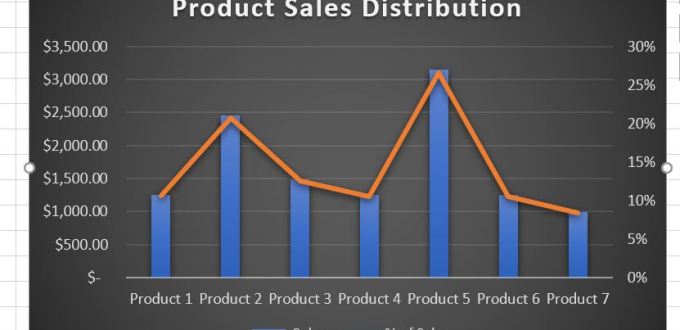
Creating a dual axis chart In my opinion, charting in Excel is an art that needs to be practiced extensively to be an expert. As I demonstrate many examples in […]
How to insert a degree symbol in Microsoft Word

How to Insert Degree Symbol in Microsoft Word I recently created a post on How to insert the degree symbol in Google Docs. The post received quite a few views […]
How to add a call out Arrow to an Excel Spreadsheet
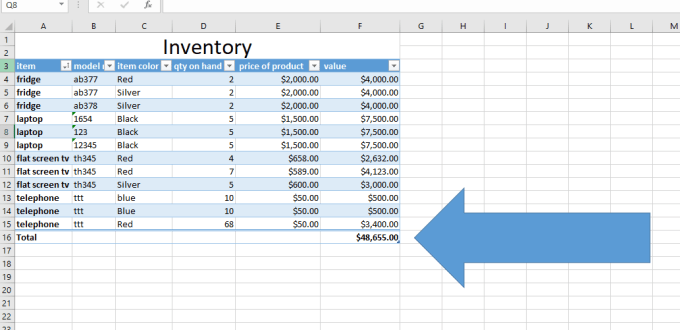


How to add a call out Arrow to an Excel Spreadsheet Lets pretend that you have an Excel Spreadsheet with an important number that you do not want your viewers […]